

Performance as a Core Product Feature
At Snapchat, we don’t just see performance as a requirement; we treat it as a core product feature. For millions of users, the app is the camera. That critical "open-to-camera" flow needs to be instant and reliable, every single time. But how do you ensure a quality experience for all users, not just the median? As our app and team grew, we needed a way to find and fix performance issues without impacting the user experience.. Here’s how we think about performance at Snapchat, what we’ve learned, and how we built a production tracing system from the ground up to tackle our biggest performance challenges.


How Snapchat Measures Performance at Scale
Having a fast and performant app is critical to providing the best user experience. If the app doesn't feel lightning fast, or if it hangs or drains a phone's battery, no one will want to use it. Our features have to work reliably no matter what kind of phone someone is using or their network quality.
Some performance issues are encountered only rarely but can still be frustrating. We wanted to learn what the biggest pain points were for most people as well as the infrequent performance issues experienced by a small percentage of users.
Guarding the p90: Protecting the Tail Latency
Instead of just tracking median performance, we obsess over tail latencies, specifically the 90th percentile (p90). While p99 is often the standard for backend reliability, we focus on p90 for mobile performance to strike a balance between capturing critical outliers and filtering out the extreme, non-actionable noise often found at the very edge (like device thermal throttling).
This approach actively guards critical journeys like "open-to-camera" and page interactivity. By monitoring p90 across various segments (like device capabilities and OS version), we can gate rollouts when tail latencies regress. Tracing gives us the visibility to protect the worst-case user experience, ensuring the app remains fast for everyone, not just the average user.
Deep Dive: A Tracing System Built for Production
To get this visibility, we rely on a custom tracing system that has evolved organically alongside our app over the last several years. While standard toolkits have since matured, building and refining our own solution allowed us to prioritize minimal runtime overhead from day one, optimizing specifically for the constraints of our unique "open-to-camera" architecture.
Our client tracing system centers on three core stages designed to minimize impact and maximize efficiency:
The Tracer API: This is our minimal interface for creating performance signals. Developers use it to emit Sync Spans (for scoped work like function calls), Async Spans (for work across threads like network calls), and Counters/Perf Events (for numeric signals like CPU usage).
The Session Container (Bounded Buffer): This is where the magic of efficiency happens. It groups spans, timing data, and metadata into a bounded, in-memory buffer. This ensures that our tracing overhead is low and predictable.
The Publish Pipeline (Protobuf Conversion): When a session ends and sampling configuration permits, the data in the bounded buffer is immediately converted into a Protobuf. This data is then scheduled for publishing to our telemetry backend for aggregation and analysis.
This design keeps the memory footprint low and gives us clear visibility and control over the performance data before it leaves the device.
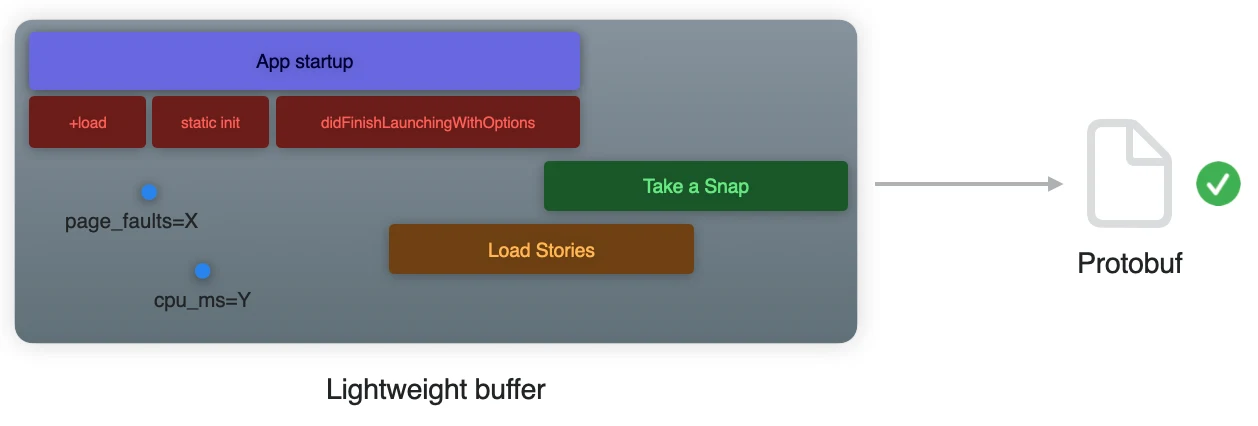
To capture the crucial cold-start experience, we initialize tracing as early as possible in the app lifecycle, during the process load phase. We record key startup points like Objective-C load, main entry, app delegate initialization, and the first screen setup . We align these app-level spans with OS-provided launch measurements when available, giving us a unified view from process start to a user-visible milestone like the "first interactive camera".
We also use a powerful technique called Retroactive Spans. If you know the start and end time of an operation after it happens (like a network fetch), you can insert a span for it. This allows the trace to reflect reality even if you couldn't mark it live.
To keep overhead low while still collecting actionable data, we use a dynamic sampling strategy.
Baseline Sampling: Tracing occurs on a randomized, small subset of sessions.
Employee/Internal Sampling: Internal builds can collect data at a higher rate for diagnostic purposes.
Token-Based Capture: We can grant ephemeral "tokens" to specific users or sessions to enable a full captured session. This lets us target collections for deep traces on emerging issues, then revert to baseline once fixed.
All of this is server driven. This gives us a low steady-state cost with the safety and ability to quickly and selectively increase fidelity.
Case Studies: Using Tracing to Pinpoint Regressions
This system has become our first line of defense against complex performance regressions. Because we guard the p90, we often catch issues that only manifest under specific, high-load conditions.
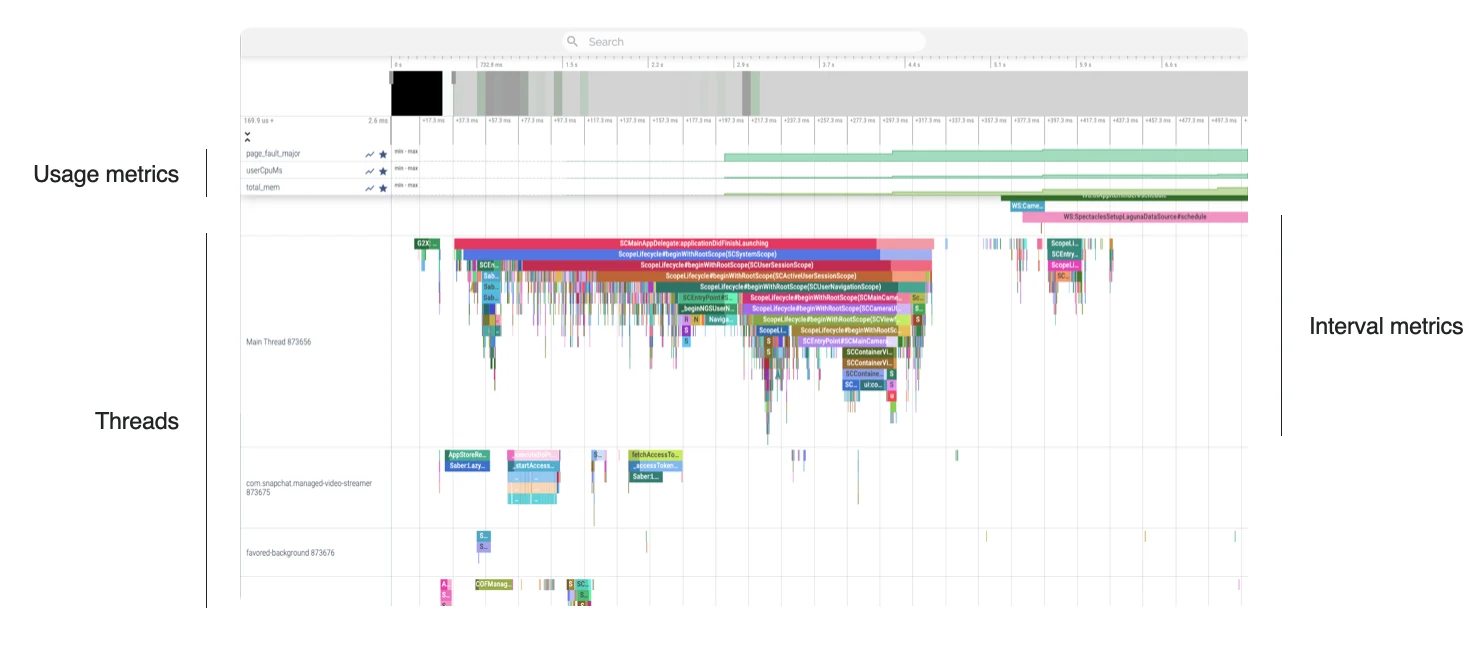
Previously, these regressions were incredibly difficult to debug. Off-the-shelf tools showed us global resource usage but lacked the granularity to reveal complex thread interactions. By deploying our custom tracing infrastructure, we turned these "unknowns" into concrete wins:
Unmasking Disk Contention: We faced scenarios where the app stuttered despite healthy CPU metrics. Standard tools missed the root cause, but our traces visualized a "thundering herd" effect—revealing that many concurrent threads were aggressively competing for disk I/O.
Solving Priority Inversion: We encountered severe performance dips that looked like random stalls. Existing tools couldn't correlate lock holding times with thread priority. Our system successfully diagnosed a priority inversion where critical UI threads were being blocked by low-priority background work, allowing us to ship a fix immediately.
Language Interop Overhead: In a mixed-language codebase, the cost of bridging can be invisible to standard tools. Our traces exposed a hidden bottleneck where heavy concurrency was causing contention deep within the Objective-C runtime during dynamic class lookups. We also visualized the specific cost of Swift/Objective-C interoperability during startup, pinpointing exactly where language bridging was dragging down initialization speed.
Blocking System Calls: Brief system calls often slip past profilers but still stutter the UI. We caught unexpected IPC activity on the main thread, specifically secure Keychain operations, identifying heavy work that needed to be moved immediately to the background.
The Future of Performance at Snap
As Snapchat continues to scale, this tracing infrastructure has become essential to our engineering strategy. It allows us to maintain low overhead through smart sampling, capture enough detail to debug tail latency regressions quickly, and enforce p90 guardrails on critical flows directly protecting real user experiences. By prioritizing the "open-to-camera" latency and analyzing component-level spans, we ensure that our features work reliably regardless of device class or network quality.
In 2026, we are growing our team to tackle the next generation of mobile performance challenges. We are looking for talented engineers to help us evolve our tracing architecture and build systems that make the app feel lightning fast for everyone. If your passions lie in mobile architecture, low-level systems engineering, or solving complex concurrency and contention issues at scale, we encourage you to consider a role within our dynamic team!