
Building the Spatial Interaction and Interface Frameworks for Specs
An inside look at our process for building the interaction and interface frameworks for Specs: Spectacles Interaction Kit (SIK) and Spectacles UI Kit (UIKit).
For over a decade, Snap has been building toward a new computing paradigm. One that keeps you present in the real world instead of pulling you into a screen. Specs bring that vision to life: see-through displays, natural controls with your body, and shared experiences grounded in your surroundings.
Building for this paradigm is fundamentally different. Interaction is embodied. Your hands, your voice, even a companion controller on your mobile device. Fusing these inputs into something that feels intuitive, not overwhelming, is a challenge for the emerging medium of augmented reality. Developers are already tackling that challenge on the Spectacles platform, building everything from award-winning hackathon projects that go from idea to working prototype in under 48 hours, to collaborative workbenches where teams can sketch, connect ideas, and build 3D objects together in the real world using just their hands and voice, to spatial arcade games with hand-tracked grabbing and shooting.
That is why we built Spectacles Interaction Kit (SIK) and Spectacles UI Kit (UIKit). These spatial-first toolkits handle the hard parts of interactions and interfaces so developers can focus on creating great experiences and applications. Both SIK and UIKit are published with full source code, and are designed to be read, modified, and extended by lens developers for deep customizations when necessary. SIK and UIKit are already the foundation of hundreds of AR Lenses built by developers around the world!
In this blog, you'll learn:
What SIK and UIKit are: our frameworks for interactions and interfaces, and how they fit together.
Our core design principles: what we prioritized when designing SIK and UIKit, such as building spatially-native and human-centered systems, making our codebase easily readable and extensible, and maximizing development velocity.
How we tackled hard problems: such as hand gesture disambiguation and targeting accuracy, maximizing performance on wearable hardware, and UI component architecture.
Whether you're exploring Spectacles development for the first time or looking for a deeper understanding of the frameworks, this post will show you what we built, why we built it this way, and the engineering behind making it all feel effortless for both developers and end users.
What are SIK and UIKit?
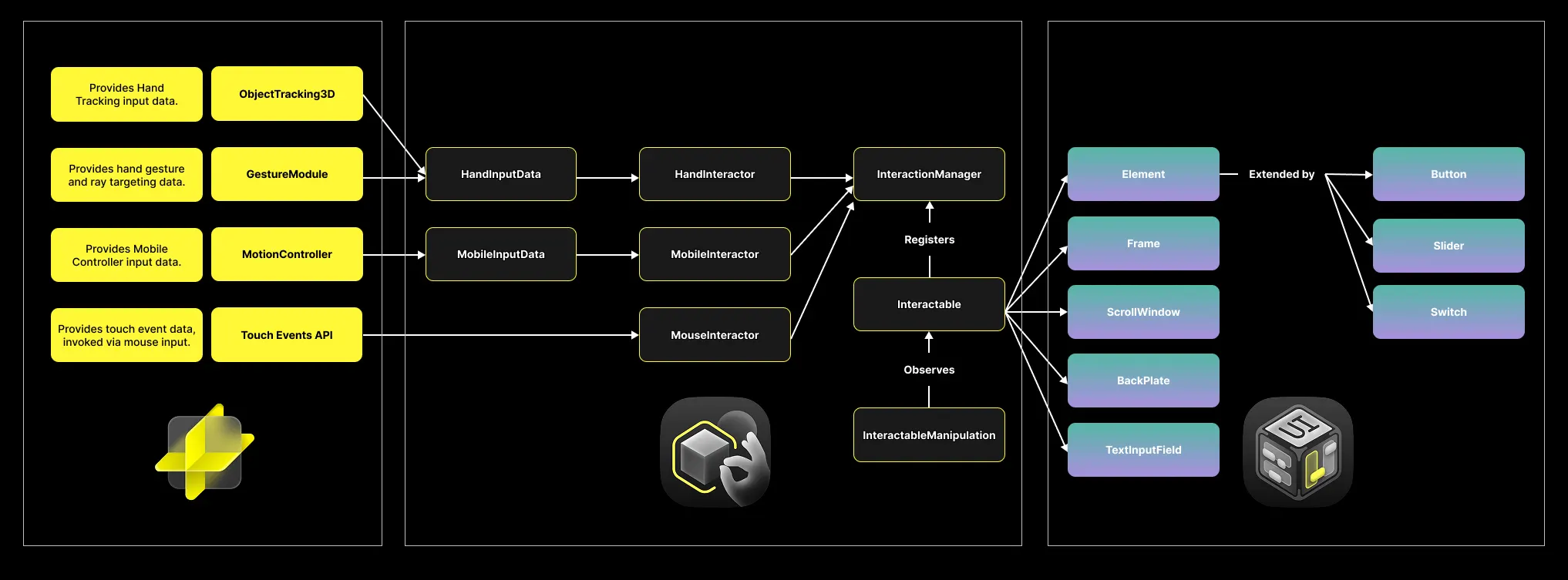
SIK is the interaction framework. SIK (middle box in the image above) consumes input (examples include spatial hand data, hand gesture recognition, mobile controller position & rotation, and more - left box in the image above) and transforms it into reliable, high-level interaction events. When a user points or pinches with their hands, SIK figures out when they've triggered an action, what they're targeting, and how they are interacting. It handles the physics and timing of spatial interaction so you don't have to.
UIKit is the interface framework. UIKit (right box in the image above) takes SIK's events and leverages them to create familiar UI elements and behaviors like: buttons that respond to hover and press, sliders that track drag, scroll windows that feel natural in 3D space, and frames that act as containers for atomic elements. Components already come with idle, hover, and active states, complete with visual and audio feedback, out of the box.
Together, UIKit and SIK, are the foundational building blocks for spatial experiences. They give you performant, scalable and intuitive interactions and interfaces out of the box. Stop getting bogged down in building the basics over and over. Bring your ideas to life with SIK and UIKit!
Core Design Principles
Spatial-first, not an adaptation. We specifically did not start with mobile UI conventions and adapting them to 3D. We started from scratch, asking: How do you interact when an interface involves you, your body and the real world? The result is a system designed for depth, for embodiment, for interfaces that exist in the world rather than floating in front of it.
Multi-modal by default. Out of the box, Specs support hand tracking and a companion controller from the Specs mobile app. SIK treats both as first-class citizens, running simultaneously. Pinch a button with your fingers or tap it on the mobile touchpad; the same code handles both. Under the hood, this is enabled by our Interactor and Targeting Mode architecture:
Investing in TypeScript: SIK was one of the first internal use cases of Lens Studio's TypeScript support. This effort ensured the system was stable for production use to build robust real-time 3D applications. TypeScript lets us build more complex codebases faster, safer, and more productively than JavaScript. This productivity compounds as the platform continues to grow.
SIK and UIKit are built using only public APIs. Every line of TypeScript is built on the same Lens Studio primitives available to any developer. There's no secret sauce, no private system calls, no undocumented hooks. You could build SIK yourself. We knew spatial interaction was a hard problem every developer would face, so we did the work for you.
The code is readable and unlockable. Both SIK and UIKit ship as an .lspkg package with a single layer of protection: readable by default, editable by unpacking. Read any .ts file and study the implementation. Right-click the package and select "Unpack" to make it fully editable. No special permissions, no hoops. We trust developers to understand the tradeoff: experienced developers already know they should manage local modifications responsibly. We'd rather give you that freedom than lock you out, because sometimes you need to customize behavior that is bespoke to your application.
Built with multi-user experiences in mind: Our goal is to make shared experiences as easy to build as experiences for single users. SIK was built to be compatible with Spectacles Sync Kit. Components like buttons, sliders, and manipulatable objects can sync state across devices and users with a single flag. Building shared spatial experiences is simple on the Spectacles platform!
Technical Challenges We Solved So You Don't Have To
Spatial interaction and interfaces are full of subtle and difficult problems. Here are a few we've spent time digging deep into, and the engineering that went into solving them.
The problem: Even with accurate raycasts, raycasting can break down when your hand is very close to a UI element. Small hand movements translate to large angular changes. But, there's an even harder problem: when your finger is touching a button, how does the system know if you want to poke it or pinch it? Both gestures happen at close range, and getting this wrong means frustrated users.

The solution: We built the Interaction Plane, a zone in front of elements that triggers a different interaction mode. When your hand enters this zone, SIK switches from raycasting to physical targeting. Your fingertip becomes the cursor.
Each of these hand positions would interact with the panel differently. Position A would use far-field raycasts, using larger arm motions to guide the targeting. Position B would use near-field raycasts, using small index and wrist adjustments to guide the targeting. Position C would fade the raycast to guide the user to physically touch the buttons instead.
Here's a look at some of the code that makes this work:
For gesture disambiguation between poke and pinch gestures, we use bistable thresholding in the PhysicalInteractionProvider. When you're already poking, the system uses a larger detection radius to maintain contact through hand tracking noise:
The unified state machine also enables seamless Poke → Pinch transitions. If you poke a button and then pinch without lifting your finger, the system recognizes this as a gesture transformation, not two separate events. So, you can poke to select, then pinch to drag, without ever losing your target.
Finally, buttons also enforce poke directionality, so they only trigger when pressed from the front. No accidental activations from the side or behind.
The result: Near-field interaction that feels like touching a real surface. Improving the user's comfort and confidence in the near-field interaction zone is always a priority of ours. We plan to continue improving and stabilizing targeting intent prediction in upcoming versions.
If objects are out of arm's reach, you need raycasting to target them. But, a lot of users lack experience with this style of input. So, this method requires a lot of thought and iteration to get it to feel intuitive for users. Early versions of our cursor would "stick" to the depth of the first object you targeted. This felt unresponsive and unintuitive. If you targeted a button 30cm away, then wanted to select something 2 meters out, the cursor stubbornly hovered at 30cm until you explicitly "acquired" the distant target. Moving between targets at different depths was a confusing tug-of-war between intention and hidden information.
The solution: The latest version of our cursor system required a complete rewrite, and it paid off. Instead of committing to one object's depth along the targeting ray, we score every interactable within a targeting cone based on proximity to the ray:
The cursor depth along the targeting ray becomes a weighted average, not a binary commitment. As you sweep your aim from a near button toward a distant object, the cursor smoothly transitions through depth. This makes targeting feel forgiving without sacrificing precision.
The cursor also uses context-aware depth smoothing with two spring systems that have different response curves:
It feels fast for 3D objects in the world, slow and precise for dense UI panels. The cursor also fades automatically as your hand approaches an InteractionPlane, seamlessly handing off to fingertip targeting.
The result: A cursor that feels like a natural extension intent, not a sluggish pointer fighting against you.
The problem: Spectacles are wearable computers with strict compute, power and thermal constraints. So, optimization is incredibly important. If the interaction layer is slow, your entire experience suffers. The performance of real-time interaction and interface systems is an ever-present concern as the form factor of each generation of wearable computers gets more streamlined.
The solution: Treat performance as an ongoing discipline, not as one-off optimization efforts. With each release of SIK and UIKit, we deliver new features and systems while also optimizing the existing ones.
Our recent version releases include a bunch of great optimizations. SIK v0.16.4 introduced a new FrameCache system that eliminates redundant per-frame calculations, refactored hand visual proximity checks to use time-slicing and processing colliders in batches across multiple frames, and conditional spherecasting for poke detection that only fires when hands are near colliders. UIKit v0.1.4 rebuilt the RoundedRectangle mesh to move per-fragment shader work into vertex data, reducing GPU power draw by ~40-50% compared to previous versions, as well as baking dynamic graphics into textures for reduced shader complexity, and reduced redundant material updates during initialization.
You can learn about new features, improvements, and optimizations with each version in the release notes for SIK and UIKit. This is the result of continuous profiling, iteration, and a team that treats “fast and efficient” as a starting point. When you build with SIK and UIKit, you inherit all of these improvements with each version release.
The earliest versions of SIK had cursors that could jitter depending on the object it was targeting, especially small objects with uneven surfaces: a common problem with hand-tracking based raycast targeting. When targeting, the cursor visibly popped on and off the surface. In extreme cases, targeting felt delicate and unreliable.
An opportunity for improvement: Our raycasting system used an iterative-approximation algorithm (a GJK-based approach) that converges on a "close-enough" result rather than computing an exact intersection. This works well for medium to large sized objects, but accuracy degrades significantly at smaller scales. Exactly the scale of UI and interactive elements in AR, which are often just a few centimeters.
The fix: We replaced the iterative algorithm with direct geometric ray-primitive intersections for common shapes (boxes, spheres, capsules, cylinders), while improving the performance. Instead of iterating toward an estimated intersection, we now calculate the exact hit point and normal analytically.
The result:
Eliminated jitter. Cursors now sit precisely on surfaces, even small ones.
Up to 45% faster. Geometric solutions outperform iterative approximation.
Scale-independent accuracy. Works reliably whether your UI is 10cm or 10m away.
UI components sound simple. A button is just a thing you click, right? But in spatial computing, a button needs: a physics collider for hit detection, an Interactable component that tracks hover/trigger/drag states, a state machine managing transitions between idle/hovered/pressed/toggled, different visuals per state/style/theme, and feedback (animations, sounds, effects) that communicate state changes. Building this from scratch for every component is tedious and error-prone.
The architecture: UIKit uses a modular Element + Visual = VisualElement pattern. The Element handles logic (colliders, state machines, events). The Visual handles appearance (meshes, materials, animations). The VisualElement orchestrates state changes into visual effects. This separation means you can swap visuals without rewriting logic, or extend base classes to create custom components while still leveraging everything UIKit provides.

Some of the details we handle for you:
Responsive sizing. You can't just scale a button—that skews corners and curves. UIKit uses a custom Size parameter that controls bespoke meshes with custom vertex topology. The material uses a vertex shader to resize the mesh and recalculate UVs from scratch. This creates custom visuals with correct borders, dynamic gradients, and scalable textures at any size.
Scrolling physics. ScrollWindow implements momentum scrolling with edge “bounce back” using a full spring-damper physics system. The scroll feels like it has weight and inertia, decelerating smoothly when you release, then bouncing elastically at the edges.
Nested event handling. What happens when you drag a Slider inside a ScrollWindow? A naive implementation would accidentally scroll the window. UIKit's event propagation system lets parent containers intercept or pass through child events. Drag a slider, and the ScrollWindow knows to stay put.
Start Building Today
These are just a few of the challenges we tackled while building and improving SIK and UIKit. The problems are deep, but the goal is simple: make spatial interactions and interfaces feel natural for users, and make building AR experiences simple for developers. If you're ready to start building, here are some great resources to check out:
Getting Started:
Tutorials:
Sample Projects:
GitHub: Spectacles Hub
GitHub: Spectacles Sample Projects
Community Projects:
Acknowledgments
Spectacles Interaction Kit and Spectacles UI Kit are the result of collaboration across multiple teams at Specs Inc. We'd like to thank all of the engineers, designers, and researchers who contributed to these frameworks, and the broader Spectacles developer community whose feedback continues to shape our work!