
Snap Cloud: A Backend for Spectacles, Powered by Supabase
Introduction
Building compelling experiences for AR glasses often demands more than what runs on-device. Multiplayer games need shared state, multi-level games require persistent progress, fitness challenge Lenses need shared state and leaderboards. . Until now, Spectacles developers who wanted backend capabilities had to provision their own infrastructure — spinning up servers, managing databases, handling authentication — all before writing a single line of Lens logic.
Snap Cloud changes that. It is an integrated backend platform, powered by Supabase, that gives Spectacles developers production-grade backend services directly within Lens Studio. Databases, file storage, server-side logic, and realtime connectivity are all available with minimal setup — no separate cloud accounts, no manual credential wiring, and no authentication plumbing are necessary.
In this post we walk through why we partnered with Supabase, how the architecture works under the hood, and what the developer experience looks like from the first click to a running Lens.
Partnership with Supabase
When adding backend capabilities to the Spectacles developer platform, we determined that the operational complexity of hosting an open-source stack in-house would pull focus from building a great developer experience. Instead, we chose a deep engineering partnership with Supabase to provide the required broad set of backend primitives—like relational databases, object storage, and realtime pub/sub—in a way that is approachable for AR developers. This partnership allows us to focus on the Spectacles-specific integration layer while leveraging Supabase's proven infrastructure expertise.
Supabase stood out for several reasons:
Postgres-native — Every project gets a full PostgreSQL instance with Row Level Security, extensions, and the full SQL surface area. There is no proprietary query language to learn.
Open-source foundations — Supabase is built on top of proven open-source components (PostgREST, GoTrue, Deno Edge Functions, S3-compatible storage). This means rich community resources, transparent internals, and well-tested primitives. Crucially, it also means we can contribute directly. For example, we developed and upstreamed a Snapchat OAuth provider into Supabase's open-source GoTrue authentication service — so the identity integration isn't a bolt-on; it lives in the Supabase codebase itself.
Realtime built in — Supabase Realtime provides instant, bi-directional data sync out of the box — a natural fit for collaborative AR experiences where multiple Spectacles users interact in the same physical space. It bridges the gap when the Connected Lenses System reaches its limits, specifically when developers need to execute server-side logic or need greater control over how data is processed and stored.
Developer ergonomics — The supabase-js client library is widely adopted and well-documented. By packaging a Lens Studio-compatible version of this library, we give developers access to a familiar API surface without leaving their AR development environment.
Global Infrastructure — Supabase runs on AWS and supports project deployment across multiple global regions, including the United States, Europe, and Asia-Pacific. Each project's database, storage, and auth services are co-located within the chosen region, and Edge Functions are distributed globally for low-latency execution close to end users. This means developers in any supported region can expect the same level of performance and reliability.
We maintain control over access policies, cost management, and data sovereignty — while Supabase handles the complexity of scaling Postgres, storage, edge compute, and realtime services. The partnership allows us to focus on what we do best — the tight integration with Snapchat's identity layer, Lens Studio's toolchain, and the unique requirements of on-device AR — while Supabase provides battle-tested infrastructure at scale.
Architecture
At its core, Snap Cloud adds Supabase's full suite of backend capabilities to your Lenses. When you create a Snap Cloud project, an isolated Supabase project instance is provisioned for you, giving you:
PostgreSQL Database — A fully managed, scalable Postgres database with Row Level Security (RLS). Use it to persist game state, track progress across sessions, or share data between users. RLS policies let you control access at the row level — for example, ensuring users can only read and write their own data — with rules evaluated server-side on every query.
Storage — Upload, organize, and serve files of any type: images, videos, 3D models, user-generated assets. Storage is fully integrated with your Postgres instance and governed by the same RLS policies, so access control is consistent across your entire backend.
Edge Functions — Run custom TypeScript or JavaScript logic server-side, close to your users. Edge Functions are globally distributed for low latency and can be used for content generation, game logic, media processing, and more. They execute in Deno's secure runtime, so your server-side code is sandboxed by default.
Realtime — Subscribe to live database changes and broadcast events to connected Lens clients in milliseconds. Use Realtime to synchronize state across multiple Spectacles in a shared session, push live updates from Edge Functions, or build any experience that benefits from instant, bi-directional communication.
All of these services are accessible through a single client library (supabase-js), configured for Lens Studio's TypeScript environment.

Lens Studio Integration
A key design goal was making Snap Cloud feel native to the Lens Studio workflow. We achieved this through two integration points: the Supabase Plugin and the SupabaseClient asset.
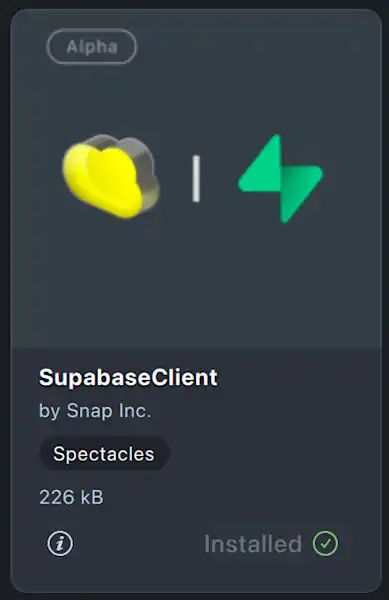
The Supabase Plugin is installed from the Lens Studio Asset Library and surfaces directly in the Window menu. It provides a management interface for your Snap Cloud projects: creating new projects, viewing existing ones, opening the Snap Cloud Dashboard, and importing project credentials — all without leaving Lens Studio.
The SupabaseClient asset bundles a Lens Studio-compatible version of supabase-js. Once added to your project, you can initialize the client and begin making requests with just a few lines of code.

Seamless Authentication via OIDC — One of the trickiest parts of integrating a backend into any client platform is authentication — and on Spectacles, the constraints are uniquely demanding. Significant friction will be introduced when users wearing Spectacles are required to tap through login screens or enter passwords; authentication must happen invisibly, the instant a Lens launches. We solved this by building an OpenID Connect (OIDC) bridge between Snapchat's identity system and Supabase's GoTrue authentication service.
Snap Cloud actually implements three complementary auth flows, each tailored to a different surface:
Snap Cloud Dashboard — Developers log into cloud.snap.com using their Snapchat account via standard OAuth. This is the management surface for creating projects, configuring databases, and deploying Edge Functions.
Lens Studio — When a developer opens the Supabase Plugin in Lens Studio, they are seamlessly signed in to the Snap Cloud Dashboard via single sign-on (SSO). One click opens the dashboard in the browser, pre-authenticated — no separate login required.
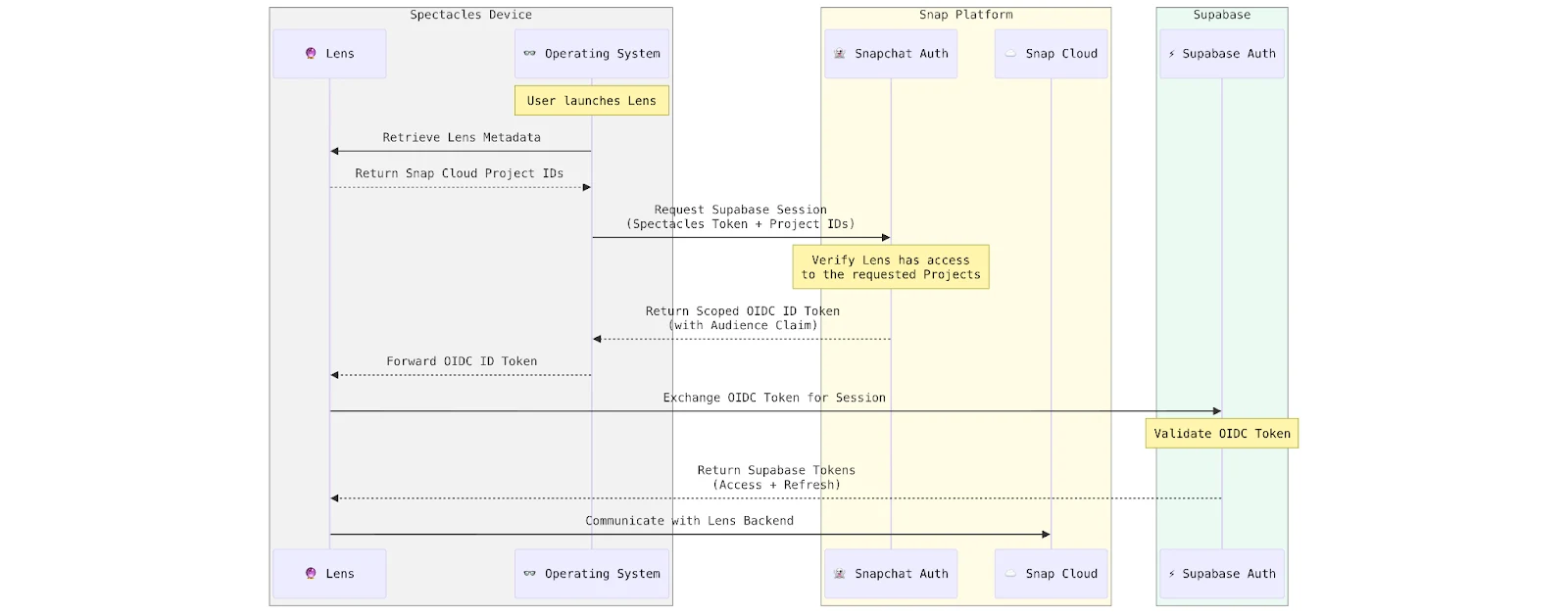
Spectacles (on-device) — This is the most interesting flow. When a user launches a Lens that uses Snap Cloud, the platform automatically establishes a secure session against the correct Supabase project — without any user interaction.
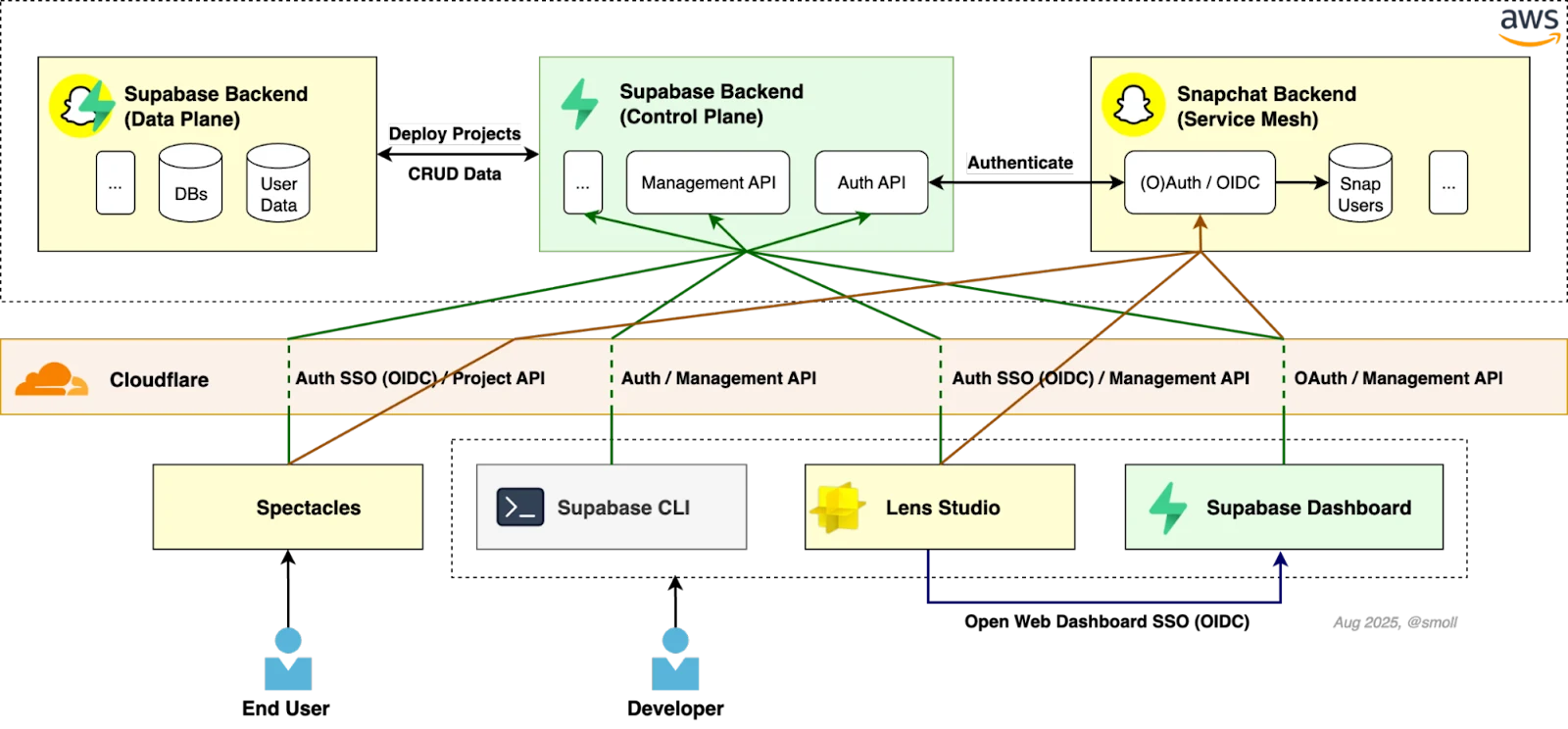
The on-device flow works through a layered process. When a Lens with a Snap Cloud backend is published, the associated Supabase project identifiers are embedded directly in the Lens metadata. This means that when the Lens is launched on Spectacles, the platform already knows which backend to connect to — no extra network round-trips needed, reducing launch latency. The platform then issues a scoped OIDC identity token for the authenticated Snapchat user and the specific Supabase project. The Lens exchanges this token for a Supabase session in a single API call.
There is no OAuth redirect flow, no token management, and no login UI to build. Supabase verifies the token against Snapchat's OIDC provider, validates the project scope, and establishes a session. From that point forward, all database queries, storage operations, and Edge Function invocations carry the user's authenticated identity — and RLS policies enforce access control accordingly.
Security by design — An important architectural decision: the token exchange is performed outside the Lens runtime. Lens code — which runs JavaScript authored by third-party developers — never has direct access to the underlying Snapchat user tokens or the authentication handshake. The exchange is handled by the operation system, and the Lens receives only the resulting session. This isolation boundary ensures that even if a Lens contained malicious code, it could not intercept or misuse the identity credentials. Security was a first-order design principle, not an afterthought.
Local Development with CLI and MCP — For developers who prefer working outside the Lens Studio GUI, the Supabase CLI fully supports Snap Cloud. Running supabase with the --profile snap flag directs all CLI operations — local database testing, Edge Function development, schema migrations, and deployment — to your Snap Cloud project. This gives you the same CLI workflows that Supabase developers already know, pointed at your Snap-hosted backend.
We also support AI-assisted development through the Model Context Protocol (MCP). MCP enables tools like AI coding assistants to understand and interact with your Snap Cloud project context — your database schema, Edge Functions, and storage configuration — so you can iterate on backend-powered Lenses locally before deploying. This closes the loop between local Lens development in Lens Studio and the remote backend services that power it.
Developer Dashboard
Every Snap Cloud project comes with a full-featured web dashboard at cloud.snap.com. This is a customized deployment of the Supabase Dashboard — not a fork, but a tailored instance with Snap-specific branding, terminology, and features enabled for the Spectacles developer experience. Features that are not relevant to the Spectacles ecosystem are disabled, while the surfaces developers need the most are front and center. From the dashboard you can:
Table Editor — Visually create and edit database tables, columns, and row-level security policies without writing SQL.
SQL Editor — Run raw SQL queries against your Postgres instance for advanced operations.
Storage Browser — Upload, organize, and manage files in your storage buckets.
Edge Functions — Deploy and monitor server-side functions.
Realtime Inspector — Observe live events flowing through your Realtime channels.
Authentication — Monitor active users and sessions.
AI Assistant — Get help writing queries, debugging RLS policies, and exploring the documentation — powered by an LLM with access to Snap Cloud-specific documentation via retrieval-augmented generation (RAG).
The dashboard is accompanied by dedicated developer documentation at cloud.snap.com/docs, which covers Snap Cloud-specific guides and API references with features tailored to Spectacles development.
The dashboard opens directly from the Supabase Plugin in Lens Studio, keeping the management experience one click away from your development environment.

Seamless Lens Integration
The entire flow — from project creation to a running, authenticated Lens — is designed to minimize the steps between "I have an idea" and "it works on Spectacles."
Install the Supabase Plugin and SupabaseClient asset from the Lens Studio Asset Library.
Create a Snap Cloud project from within the plugin.
Import credentials into your Lens project with one click.
Authenticate with a single API call. The session is established automatically using the Snapchat identity of the Spectacles wearer.
Build — Query your database, upload files, call Edge Functions, subscribe to Realtime channels — all through supabase-js.
No server provisioning. No credential juggling. No authentication UI. The developer focuses on the AR experience, Snap Cloud handles the backend.
Snap Cloud powered by Supabase is currently available as an alpha program, and only approved developers can sign in and use the platform.
If you are building Spectacles Lenses that would benefit from backend capabilities — persistent data, shared state, server-side logic, file storage — we invite you to apply for the alpha program.
Alpha participants get access to the full feature set described above: Databases, Storage, Edge Functions, Realtime, the Lens Studio plugin and the Snap Cloud Dashboard. The alpha program is free during this period — we want the barrier to building to be as low as possible. We are actively iterating based on developer feedback, so early adopters have a direct voice in shaping the platform.
Snap Cloud is launching with a strong foundation — databases, storage, edge compute, realtime, and seamless authentication — but we are already working on the next chapter. Our roadmap includes expanding to additional regions for global coverage and lower latency. We are also investing in richer developer tooling: more AI integrations, extended MCP support, and tighter feedback loops between Lens Studio and the backend.
The platform will continue to evolve based on what developers need. Early alpha feedback is already shaping our priorities.
Snap Cloud represents a meaningful step in making Spectacles a complete platform for building rich, connected AR experiences. By partnering with Supabase — and co-developing key integration points — we bring production-grade backend infrastructure directly into the AR development workflow.
The architecture is designed with security and developer experience as equal priorities. Snap's identity layer, Supabase's open-source infrastructure, and Lens Studio's toolchain come together to let developers focus on what they do best: building experiences that transform how people see and interact with the world around them.
We are excited to see what the Spectacles developer community builds with Snap Cloud. Apply for the alpha, explore the documentation and start building.
Snap Cloud, powered by Supabase, incorporates open-source software components. For more information, please visit https://www.snap.com/terms/lensstudionotices